
iOS SDK 不支持模拟器解决办法
背景
iOS 第三方 SDK 不支持模拟器,报错提示: building for ios simulator, but the linked framework ‘’xxx(比如: IDLFaceSDK.framework)” was built for ios 解决办法.。
解决办法
首先,在Target -> BuildSettings -> Excluded Source FileNames -> Debug 中添加一行,注意,key选择 Any iOS Simulator SDK,value 中添加报错中提示的 SDK的目录,示例如下:
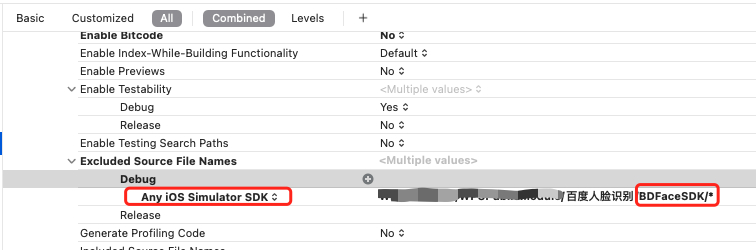
然后,在项目中,引用对应 SDK 头文件,以及使用 SDK 方法的地方添加如下代码判断
1 |
|
本博客所有文章除特别声明外,均采用 CC BY-NC-SA 4.0 许可协议。转载请注明来源 今是昨非的博客!