
Embedded binary is not signed with the same certificate as the parent app
Embedded binary is not signed with the same certificate as the parent app
背景
Xcode 10之后New Build System变为默认,编译之后一直报错,
报错信息:Embedded binary is not signed with the same certificate as the parent app. Verify the embedded binary target’s code sign settings match the parent app’s.
eg:

但是在Legacy Build System下就没有问题。刚开始直接粗暴的改回Legacy Build System,一直没来得及查具体原因,最近得空了,仔细查了一下。
过程
搜到的好多人说,是因为keyChain里证书的信任状态不对,要用系统默认,不能强制始终信任。but,我检查了之后,我的证书确实是系统默认的状态。
在stackoverflow上iOS error “Embedded binary is not signed with the same certificate as the parent app”
这里面:
- 被采纳的是:widget target下的Code Sign Identity,没有设置或者设置的和main app target下的不一致。但是,对于我来说,我检查了之后发现也与我状况不同。报错信息里就有不同,在 Embedded Binary Signing Certificate:里,一个是Not Code Signed,一个是Software Signing,所以,这个解对于我也不对
- 第二个被赞成多的答案是:keyChain里证书的信任状态不对,要用系统默认,不能强制始终信任。这个也已经验证过了,不是我的正解
- 第三个被赞最多的给出解决方法是:改回Legacy Build System。。。。这个我之前一直是这样,但是我需要解决这个问题,而不是逃避,而且我还想看一下用New Build System能加快多少编译时间
- 其次一个,说widget的depolyment target,比main app的高,也被我pass了
- 再一个,说把Watch target的”Build Settings”> “Valid Architectures”改为
$(ARCHS_STANDARD),这个我还真没验证,因为我直接用楼下一个的编译好了,但是这楼的答案被我用于消除一些个编译警告了。。。。在另一篇博客里说
- 终于,这一楼说在main app target里Build Phases中,Embed App Extensions里,勾选Copy only when installing. Finally,解决了,这一楼是对我的正解。
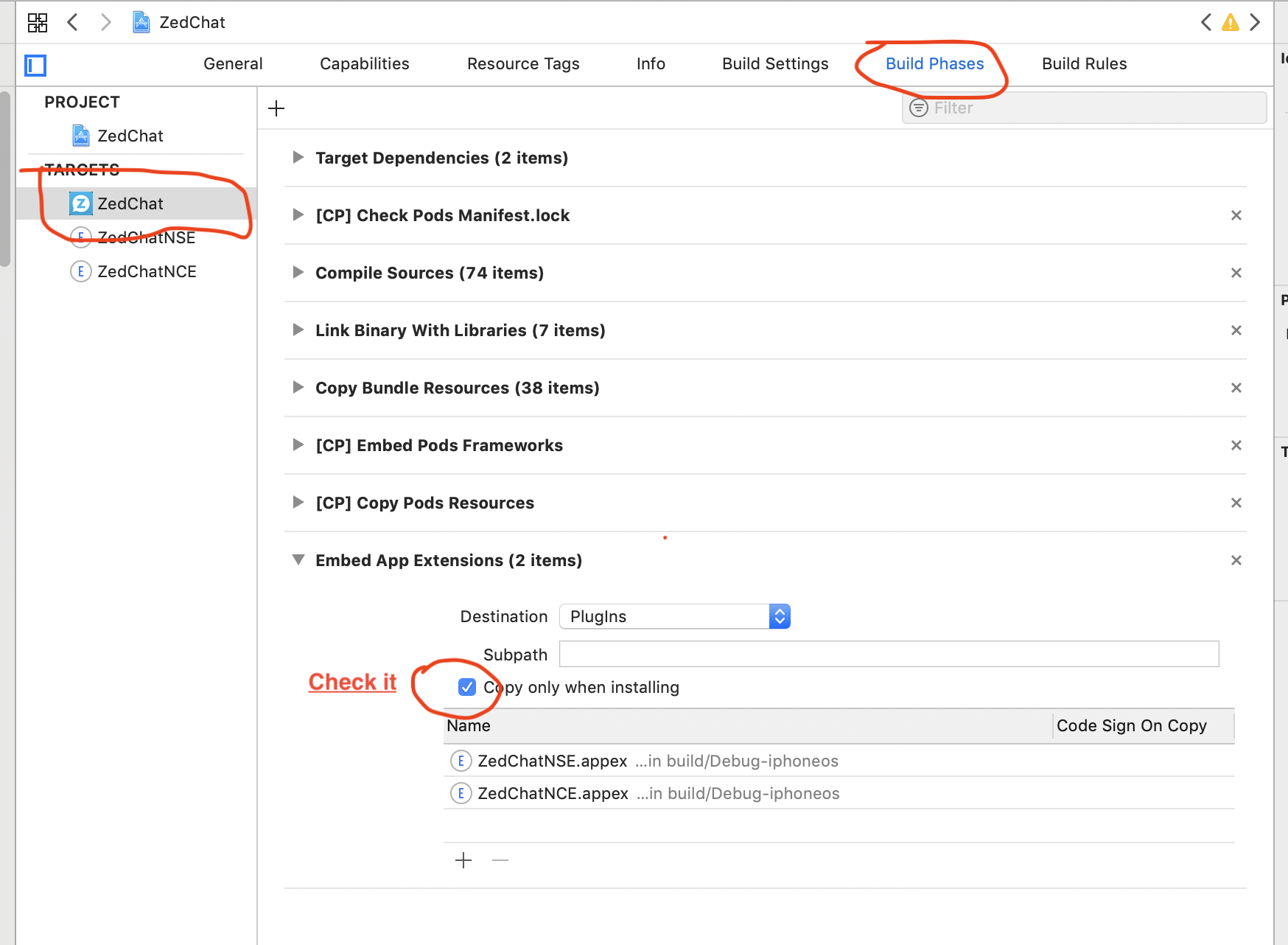
结果
遇到了报错,不要慌,先看报错信息,理解报错信息的意思,搜索别人解决方法时,仔细观察报错信息是否一样,尝试,如果结果不合适,不要气馁,往楼下看,一一仔细看,总有一楼合适。。。。。哈哈哈
本博客所有文章除特别声明外,均采用 CC BY-NC-SA 4.0 许可协议。转载请注明来源 今是昨非的博客!